

Hands on the Tascam HS-P82
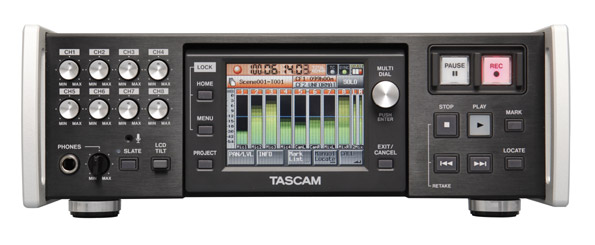
Nearly a month ago, we introduced Tascam’s new line of recorders. Now that we’ve received our first HS-P82, it is clear Tascam had a specific user in mind–those with smaller budgets, but high quality tastes. The touchscreen interface, dedicated knobs/switches, and natural controls layout lead users through a quick learning curve regardless of their level of experience.
Like other recorders such as the Sound Devices 788T, the recorder does have a stereo bus, labeled left and right. Many mixers may prefer call these mix bus 1 and 2, but the alternate label doesn’t change the function. If you are used to providing a mono mix with other mixes to a boom operator or Comtek feed, you will need an additional mixer. The simple left/right bus panning does not provide the numerous output routing options of competing recorders. So where does it fit in to the current recorder landscape?
On a cart, the HS-P82 would definitely fit with cart mixers, such as the PSC Solice and Sonosax ES64. Since the HS-P82 is tracking friendly, you’ll have everything you need on set when using the bus and communications capabilities of these mixers. You may want a laptop nearby to burn dailies via USB transfer. Or you can simply swap record drives between the two compact flash drives. With the current 1.00 software, mirroring is not available, but it should be in the early firmware upgrades.
In a bag, the HS-P82 is a bit deep, but comparable in size with a Zaxcom Deva Fusion. As an over the shoulder mixer/recorder, you are limited, as previously discussed, to the left and right output buses. However, no recorder currently on the market can provide discrete eight-channel recording, plus two additional tracks for the price of the Tascam.
The HS-P82 headphone output listens to the stereo bus, but soloing of channels is also available. If you want to use the stereo bus as a camera send, you may want an additional box. We had Remote Audio custom create such a box for camera return. The custom box provides a toggle switch, pan, and volume control to select between the recorder’s headphone output and the return.
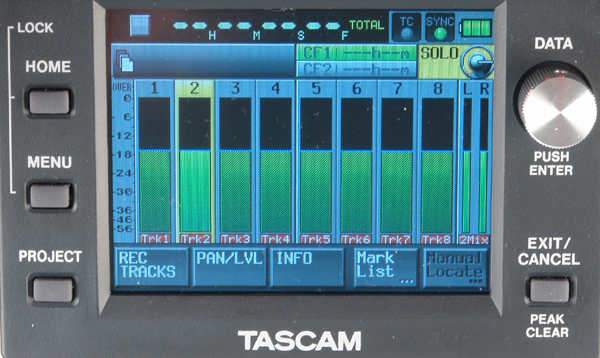 HS-P82 Menu Screen
Traveling within the menu functions is easy. In my opinion, menu functions could not be more intuitive and accessible. The home screen shows all tracks, drive selection, and timecode display. It has quick links to record enable and scene/take entry. Pressing the meter display will solo the track or stereo bus. You can also link pan and level settings to the stereo bus.
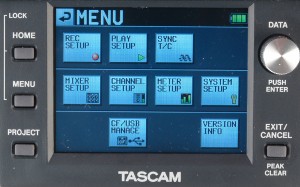 HS-P82 Menu Screen
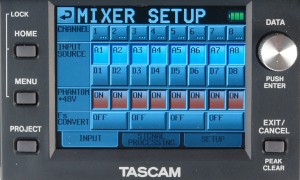 HS-P82 Mixer Screen
Pressing the menu button will give you the most access to settings, but nearly every setting page has a quick link to closely related material. For example, in the mixer setup, you can link to individual channel setups, or you can see the setups for all channels together.
Setting up a project is a simple and quick process. In the project menu, name, scene, sample rate, and frame rate are set allowing for new recordings in a new file structure in moments. The ability to set limitless markers may not come into play regularly in location audio, but it is a feature you may find handy when listening back to specific takes.
Overall, as the market continues to fill with non-linear recorders, the HS-P82 is a welcome, budget-friendly, quality addition to the fray. Tascam has added a great choice to the market.

i was wandering if the HS-P82 has the ability to
“arm recording” on timecode
exemple the AJA Kipro has a very nice feature
when the camera timecode is set to rec run.
the device detect the timecode and start recording as soon as the timecode change…
or the camera start recording.
Tanks
B.,
Unfortunately the HS-P82 does not have and “Auto Record” or “Auto Start” function. Great question though.
Skylor
Hi Scott,
“no recorder currently on the market can provide discrete eight-channel recording, plus two additional tracks for the price of the Tascam.”
I am currantly using a Korg D888 Digital Recording Sudio to capture sound and was considering going to the Tascam HS P 82 for it’s portability advantage but do I understand corectly that it does not record each chanel discretly as does the Korg. So you have to mix and then record only a stereo track?
Thanks,
Mark
Hi Mark,
The HS-P82 records all channels discretely.
For the 8 channels, you can choose whether to record as individual mono BWAV files (most common), or a single multi-channel BWAV file. The stereo mix always goes to a separate stereo BWAV file. You can choose whether to record the stereo mix file or not.
Tom Duffy (TASCAM Engineering)
Tom,
Is the RC-F82 available? I don’t see it listed at any of the vendor’s website. I’d like to know the price of it too.
Hi Suresh,
The RC-F82 is certainly available, it has been in production for a few months now. Any of the pro dealers can order this for you. I can’t suggest a price here, but it is selling in Europe for around 1020 Euros.
Tom Duffy (TASCAM Engineering)
How do get the timecode to display when recording? I see it when I am in the tc menu,but when I am recording it is not displayed running on main screen……
Tap the time display on the home screen, it will toggle between the different modes –
Current take play head
Current take remain time
Current play head wrt All takes in Scene
Remain time wrt all takes in Scene.
Timecode
Tom Duffy (TASCAM Engineering)
Hi guys..didnt know where else to write. Having an issue with the p82. Im using a cf-sd card adaptor and using sd cards for about 2 years. this week i was recording an all was fine but then it said Operation Failed ..cannot find take. I lost those takes. It happened again today. When im recording all is fine. all is normal. then dit texted me and said 3-4 takes were lost. I played back and thats what i got on the screen and the takes were lost. question, any idea why this is happening? could it be the sd card? the adaptors?
and is there a way to get those takes back?
thanks…
Can you daisy chain 2 of these units for 16 simultaneous tracks?
RK
You can use TimeCode Out from one deck to another TimeCode In to lock the units together, but you will need to press Record on them separately. This will get you files that are sample synchronized.
One university in Japan purchased 10 units to do 80 channels of synchronized Microphone recording and are very happy with the results.
Tom Duffy (TASCAM Engineering)
Tom Duffy: Would you be kind enough to give me a quick tutorial on exactly how to adjust the settings on the two HS-P82s so that they will be correctly TimeCode locked together for recording? Thanks, in advance, for your kind assistance
I have been using the TASCAM DR 680 for less critical small concert work (all classical) and have been very impressed with the micpres and ADC. How do they stack up against the P82?
IMO, it’s no contest between the DR-680 and HS-P82 when it comes to critical recording.
The HS-P82 mic pres and ADC are ranks above the components used in the DR-680, and that is reflected in the price.
The DR-680 is a very capable device that it worth 2x what it goes for, but the HS-P82 has a different design philosophy – quality and bulletproof features when you depend on it to run 24 hours a day.
Tom.
I just finished reading over the P82 manual, and have a few questions:
1) It implies that poly files of any number of tracks over 2 is possible. Is this true?
2) I must have missed the part about how to choose mirroring with 2 CF cards– where is that, and must the 2 cards be the same size?
3) The data flow rate for 8ch at 96kHz is 2.2MB/sec. That suggests that ALL Sandisc CF cards are more than capable. Is this the case?
1. Poly files are indeed any number of tracks in a single file.
Any tracks that are armed will be put in a single file, 1-8.
The iXML data includes the original track number/name, so e.g. even if you only had tracks 1,3,4,5 and 8 armed, you’ll know where they came from when the file is exported later.
The mix bus is always recorded to its own stereo BWF file.
2. CF card mirroring is coming in V1.10, we are testing that internally now, it should be available within a month. The cards don’t have to be the same size, it will continue recording to the remaining card when one gets full.
3. SanDisk Extreme III (no longer available), Extreme and Extreme Pro are all on the approved media list. For 96kHz, we want to see at least 30MB/sec specs on the card. The data going to the card includes up to 9 different files (8 mono and the stereo mix file), and each of those files involves keeping the FAT32 tables up to date as well, so the data rate of the raw samples is not the whole story.
Tom.
Good news on mirroring! And even better news on poly. Any chance that a future update could make it possible to do stereo poly files? Much less CPU overhead in the DAW. And is it possible to NOT record a stereo mix bus file? That seriously complicates importing the poly files in order. The only use I have for a 2-mix is SP/DIF out to the monitor controller for jobs that require monitor speakers.
Rich
Is it true that you cannot change the metadata after it has been recorded? Many tiimes I must change the scene or take number.
are their any issues with Avid or FCP?
-> Rich, The standard operating practice seems to be mono files, though I agree that 4 stereo files might be useful for some people.
We do now have our own Win/Mac application for doing offline conversion between Poly and Mono files, that can be used to create the stereo files.
The mix bus has its own “REC ARM” button, so if that isn’t on, you don’t get the additional stereo mix file. The file names make it easy to spot anyway.
-> Filipe, Editing metadata has been a frequently requested update, we are investigating.
Avid, FCP and other audio/video workstation software have no problems reading and importing the mono files from the HS-P82.
Tom.
Is there no way to get eight channels of discrete Outputs? Only Inputs?
(I am new to the AES/EBU DB25 cables, is it only FOUR channels of in and out??
Thinking I may have to return this unit that I just purchased….
Thank You
AES/EBU is a digital connection with 2 channels in it. It can handle up to 192kHz.
The 25 pin DSUB on the HS-P82 has 4 sets of AES/EBU inputs and 4 sets of AES/EBU outputs, giving you 8 channels in/out.
Several companies make the DSUB to XLR breakout cables that work on this. DSUB to 4 XLR female and 4 XLR male, 8 XLRs total, 8 in + 8 out signals.
You’ll need an AES/EBU to Analog (D/A) converter if you need discrete analog outputs.
Tom.
Because I am recording music stereo is the most useful format. In the interim– using the TASCAM app would be brilliant– could you please supply a link?
Rich
The converter app should be on this page:
http://tascam.com/product/hs-8/downloads/
For some reason, it’s not up yet, I’m following up on that.
Tom.
FYI, the Converter app is now available on the TASCAM HS-P82 homepage.
http://tascam.com/product/hs-p82/downloads/
direct link:
http://tascam.com/content/downloads/products/90/polymonoconverterinstaller_137085.exe
You wrote that FCP and Avid have no difficulties reading the mono files. But you did not mention poly files, which is what we use most for double system sound recording on location.
Hi Filipe,
poly files (BWF-P) support is a minefield in the various DAW and video workflow apps.
From my recollection:
Avid : can accept BWF-P, always separates the contents into individual tracks.
FCP : can accept BWF-P, but only uses the first track unless you tell it to separate to individual tracks on import.
ProTools : cannot use BWF-P (maximum 2 ch/stereo).
The BWF-P files that the HS-P82 generates are fully compliant with systems that read them, and we will investigate any reported inconsistencies.
BTW, the Mirror recording feature is in V1.10, this has been released and will be up on the TASCAM webpage later this week.
Tom.
How do I update my machine to version 1.10 ? What else has been changed? Any reason not to do this? Also I really dislike how the stereo files record to the Folder outside of the ones where the mono files record to, like the take number folder keeps the individual mono files, but the stereo mixdown goes to the scene folder..why? can I change this?
Thanks!
Yuri
Hi! I’m starting in sound recording for film and looking to invest in some equipment. I really don’t want to start with some cheap equipment just to change it within 2 months. So, I was looking to buy a Sound Devices 552 Mixer and a Roland/Edirol R44 Recorder. With the SD, i’d have the flexibility of live mixing up to 5 channels with a stereo recording for backup and sending 4 independent channels to the R44…
But then I found this Tascam HS-P82… Which as far as I’ve read (and I’ve read for a few hours now) does exactly that and more, and for almost the same price (if not less, considering cables and adapters for using the SD and R44)… Am I missing something, or can the HS-P82 really work as a reliable 8 track field mixer/recorder by itself? (Always considering sending the backup stereo mix to a camera or another digital device).
I’d appreciate input on this from any of you. Thanks in advance.
Yuri,
The V1.10 files are on the TASCAM Europe website, they should be on the TASCAM America website soon.
http://www.tascam.de/en/downloads/current/HS-P82
The update procedure is documented in the release notes pdf.
The mono files can be placed either in their own take folder (one folder per take, up to 8 mono wav files in each folder), or they can be placed directly in the session. As you noted, the stereo mix wav is always placed at the session level.
V1.10 adds the much-asked-for dual CF (mirror) recording mode, and fixes a couple of stability problems. We recommend all users to upgrade to V1.10 at their earliest convenience.
Alejandro,
You’ll have to make the decision whether a 1 or 2 device solution for your film recording is best.
We designed the HS-P82 for the best possible quality location TV and film recording, so I’d hope it is the best solution for you as well.
Tom (TASCAM)
Hi!
With the price drop I’m really thinking in buying the HS-P82. I own a DR-680 and I think it does well the job for the price, but it has a very noisy headphone amp. I’d like to know if the HS-P82 has a better headphone amp. And also, I’d like to know if the solo function is quick, because another thing I don’t like a lot of the DR-680 is that you have to press a button for about 2 seconds to solo a track. That’s way too long.
Thanks!
Juan
Hi Juan,
Of course I’m biased, but the headphone amp on the HS-P82 is great. Lots of volume, no noise. Solo is just a quick touch on the screen, you touch the meter of the channel you want to solo. Zero delay.
It has both Single and Mix modes, in Single mode it solos just the last channel you touch. Mix mode allows you to build up a mono mix of the solo’ed channels. There is a separate solo master volume as well.
The RC-F82 gives you direct button access to the Solo function at all times, and a dedicated knob for solo volume, as well as the direct monitoring level faders.
Tom (TASCAM)
Hi Tom, Thanks for the help with the dual CF Card recording, I downloaded the newest Firmware from the european site and It all installed ok…
Only one thing… I am having a REALLLY bad problem with my HS-P82. When recording in 192 and 176k the sound is coming out all distorted and horrible, its actually not even sound, its noise, not like white noise or anything but like…maybe conversion noise? I actually don’t hear the preamps, and When close the project at 192k and go to a 48k project it works fine, without changing anything, and I’m using the analog inputs, no digital ins….its hard to explain, I could record it and send it to you if you want, I want to know if you have heard about this, if its a easy fix and if so how do I do it, or do I have to send it in to Tascam to fix the problem. I hope we can fix this ASAP so I can go back to being a happy Tascam customer!!!!
Thanks!!!
Yuri
I confirmed there is a problem in V1.10 with 176kHz and 192kHz projects, this was introduced in V1.10
We will investigate and fix ASAP.
You can downgrade back to V1.04 (downloaded from the tascam.com website), but there is also V1.06 which has a couple of the stability fixes included from V1.10.
Please contact TASCAM customer support to obtain this file, you can reference this thread.
Tom.
Hi Tom,
I had the HS-p82 run out of battery without warning ( i am still on 1.10, maybe its a bug?) maybe i had the settings on wrong.. about the battery level minimum, anyways, the audio that was being recorded closed without “saving” I can see it in the CF card when I unload it on my computer but the files wont play, say 0:0:00 time, but are hundreds of mbs each…I know the audio is there, it’s just that the .wav file was not “finalized” or “closed” in the header part of it…how can I fix this? I’ve heard of other people having this problem and fixing it…please help!
Maybe if you can, email me….
Luedemann at Gmail
Thanks!!
Yuri
TASCAM Customer Support is always there to help you with these issues, but to get you going quickly:
Start up the HS-P82 again.
Use the Project screen to go to the session that had the bad shutdown.
Touch Menu.
Touch “Rebuild” in the menu.
This should fix the headers in the unfinished wave files.
Tom.
Tom saves the day!
Thank you so much Tom!
Tascam tec. support is the best i’ve dealt with, to me that is more valuable then anything!
It worked and my files were readable in pro tools!
Thanks Again!
Hi Tom. I’m a little concerned how the unit will behave in a very cold environment. There’s some winter exterior shoots coming up and that’s what bothers me. Especially the touch screen. Any feedback on that? Thanks.
The HS-P82’s rated operating temperature range is noted as 0 degrees C (32F) to 40 degrees C (104F). In practice, we will have qualified it down to -5 degrees C (23F) in order to be sure that all shipped units work well at 0C.
There is nothing inherent in the resistive touch screen that we would expect to get noticeably worse at lower temps.
Anecdotal evidence of car entertainment systems, where the interior environment can get down to -17C (1F) when left off in Winter, shows that response on touch screens is slower, but improves as temperature rises due to self-heating, etc.
Check the ratings on the CF cards you are using as well, but I wouldn’t be worried about long term damage from temperature. Avoid snow and rain settling on the device though…
Tom (TASCAM)
HI,
My HS-P82 takes an awfull amount of time to create folders by the end of the day. Is this common? Thank u.
Some slowdown for a project with lots of folders is to be expected, but I’d be interested in seeing how slow yours is getting.
This is where you’ll see a definite benefit to going to Faster/Expensive CF cards such as the Sandisk Extreme Pro or our own TASCAM brand CF-4HS (ours comes with data retrieval service if the unthinkable happens). What CF brand are you using?
You can contact me at [email protected] if you are able to send me the CF contents so I can look at them – I can arrange an upload site for large files.
Tom.
If I use a mixing board in front of this is there a way to record a mix and still get ISO’s? For example say on Channel 1 and 2 I turn down the faders bc those two people aren’t talking anymore is there a way to still have those channels recording levels but just not in the mix? I’m on version 1.10 any help would be great.
Thanks
Nicole
Hi Nicole,
Yes, that’s a common way of working.
Your mixing board will need to have direct outs for each channel if you want to record the ISOs separately, and note that there is no external input for the STEREO MIX channel, so you’ll be limited to 6 ISOs and the stereo mix (or 7 ISO and 1 mono mix) from the external board.
Don’t forget that the RC-F82 remote can replace your external mixing board in some cases – it provides basic monitoring as well as direct control of the mix in the HS-P82.
Also, see the guide to the HS-P82 written by Fred Ginsburg here:
http://filmtvsound.com/
Tom (TASCAM R&D)
Hi. I need help with some questions:
1) While recording, can I adjust the input trim knobs?
3) From reading the manual, I think the mixing levels can also be adjusted during recording, although you have to navigate a little trough the menus, can you confirm this?
Thank you!
Hi Alejandro,
Yes, the input trim knobs can be adjusted at any time, but that will affect the level of the recorded ISO tracks as well as the final mix.
The mix levels are on the home screen, under the PAN/LEVEL tab.
These can be adjusted during record as well, you just touch the desired knob and turn the DATA knob to change, or push and turn the knob to move the value quickly.
Tom.
I have extensively searched the user manual for any information regarding my query and found no help in it:
I need to know how I can have a trim/fader control when I input through the AES/EBU Digital IN/OUT connector. If this feature is not available could it be included on your next firmware update for the HS-P82 please.
Hi Ashok,
The Input Trim controls at the top left of the front panel affect the digitally controlled MIC Pres, so they are not used when in analog LINE mode or on AES/EBU digital input.
Please email me ([email protected]) with more details of how you want to use the HS-P82, and we can work out a plan to add suitable additional functions.
Tom.
Thanks Tom. I got everything figured/worked out. I’m good to go. I just hope they make even more changes in the firmware. I wish this machine had an internal hard drive or the ability to attach an hard drive and I wish it had more than two Analog outputs.
Nicole
Hi,
On my next job I will be shooting at -15 Celsius. Will the HS-P82 be all right in these conditions? Overnight It’ll be stored in my hotel room.
Thank you
Hey,
What batteries are you guys using? This machine is not field friendly I went through 5 np1s in less than 2 hours. It consumes so much power it’s crazy. Can anyone recommend a battery solution such as better NP1s, Idx or Anton Bauer batteries. I need at least 3-4 hour run time before having to change. Also AA’s don’t last so that’s a no no.
Thanks
Nicole
Hello Tom,
Would it be possible to add these additional feature to the next firmware update of the HS-P82:
– Under CF/USB Manage > CF Select > When we tap on the images of both the cards (CF1 & CF2) both the cards get selected automatically enabling Mirror mode under REC Mode, making CF1 as the default main card with CF2 as the backup mirror card.
– When the above mentioned option is selected (i.e. CF1 & CF2 selected simultaneously) there is an option to format both the cards simultaneously (i.e. parallel formatting) for either quick or full format.
I believe this will help reduce time taken to format cards (which under the current firmware is only through a serial method (format CF1 and then format CF2)
– Could the homepage layout be changed to allow for the file name to be displayed a bit longer?
– A counter for timecode on the main homepage could be a really helpful feature as well
– An option to delete the earlier take (for false starts) and retain its name (i.e. Scene/Slate/Take number)
Regards
Ashok
Hi Marius,
The HS-P82 has been tested down to -5 degrees (0 degrees official spec), but we have run other products in the HS line down to around -15 degrees. So we can say that the display and general electronics in the unit should be OK. We can’t say anything about the batteries though, so you may need advice from Trew Audio about the best way to supply power in those conditions.
Nicole,
You should get at least 3 hours with the IDX Lithium Ion NP1 batteries. I get nearly an hour with cheap NiMH NP1s and 8 phantom powered mics (not shotguns though).
Ashok,
Thanks for the ideas on making mirroring easier to use, I’ll try to work these into our upgrade plans.
On the home screen, when the info tab is displayed (so you can see the file name), you can also turn the DATA knob to scroll through the whole name and directory path. This means you can see the whole file name without going away from the home screen.
Touch the counter display at the top of the home screen to switch between various counter display modes, including TimeCode.
“Retake” is our version of false start, and is operated by pressing SHIFT + STOP, then OK on the popup. It operates as you describe, deleting the take and re-using the previous name.
Tom Duffy (TASCAM R&D)
Thanks Tom,
Seems like I should read the user manual much more closely again. 🙂 TASCAM has really thought out their features in this unit (re: Retake – TC counter). Please convey my appreciation for all these small, but significant, features that really make our lives on the field a much better experience across to the design team.
Looking forward to new additions to the firmware.
Regards,
Ashok
Hello Tom,
I seem to have come across two strange glitches:
Glitch 1:
After formatting both cards using full format, with mirror mode selected, when we proceed to create a new project, for the first time on a the newly formatted cards, I have noticed that the HS-P82 creates the new project according to current user inputs on card 1. However, on card 2, the HS-P82 retains the project name of the earlier instance.
Glitch 2:
I have noticed that the retake function, does not work consistently all the time.
Could you please check if this issue happens at your end as well? Can this be fixed in the next firmaware please?
Best regards,
Ashok Gazula
Regards,
Ashok
Hi Tom, I was wondering is it possible to think about “rename file(take)” function in your future firmware update? It’s something that’s definetely missed by all of us. Thanks!
Hey Tom,
I am running into the issue with False Take. When I hit false take instead of it going back to that take it automatically jumps to the next take is that normal? It won’t allow me to go back unless I make changes to like the scene name or something.
Nicole
I’m investigating these reports, but please report problems through the tascam website as well.
http://tascam.com/contact/support/
I figured out a solution. Unfortunately when recording with dual cf cards if you delete a take on cf card 1 it doesn’t delete it on cf card 2 so same issue sort of like what Ashok is having. I may just have to settle for recording to one card because when moving fast I don’t have time to go to CF card 2 and delete. Thanks Tom for all your hardwork and I have sent over issues using the Tascam website.
Nicole
I would like to add that I also had “Glitch 1:
After formatting both cards using full format, with mirror mode selected, when we proceed to create a new project, for the first time on a the newly formatted cards, I have noticed that the HS-P82 creates the new project according to current user inputs on card 1. However, on card 2, the HS-P82 retains the project name of the earlier instance.”
Also I’ve had a glitch where I am recording and then outr of no where I look down ( without hitting anything) and it’s not recording anything anymore, luckyly I’ts only happened about 3 times and I was always able to re-do the scenes, if I was for instance recording a live event or show, it would have been lost….had to pull out the…yeah that last take was not very good for sound, can we do a re-take? ….0_o
Ashok,
I believe the files and folders on the mirrored CF are only created when the Recording starts (not when the project is created), so those could be folders you made when you did the initial format for that card… In my tests here, the folders and files are identical.
I duplicated the problem with RETAKE in V1.10, it only happens when Mirror recording mode is ON.
Yuri, are you saying that you ended up with a short take (because the unit went from REC->STOP for an unknown reason), or that no take was recorded at all (even though the timecode display in the LCD was updating in RED – meaning recording).
Is this in mirror recording mode?
Please use the support form on the tascam website and give us full details of the cards you are using, and other project settings.
Hello Tom,
I use the Soundfield ST-450 surround microphone (http://soundfield.co.uk/products/st450.php), which outputs 4 channel audio that contains surround sound information called B-format audio, to record surround sound on location using the TASCAM HS-P82.
I noticed with the TASCAM HS-P82 that POLY mode of recording is possible, however, I am curious to know if clubbing 4 individual MONO tracks to make a QUAD file in POLY mode is possible, or is it limited to just STEREOPHONIC poly files only??
If it is not possible to club beyond a STEREOPHONIC poly file, would it be possible to include a firmware update to make it possible to make:
QUADPHONIC POLY Files
HEXAPHONIC POLY Files
OCTOPHONIC POLY Files
Regards,
Ashok Gazula
Is there a way to get better output routing maybe an hardware update? Not being able to do individual outputs is insane.
Also is there away to add a remote roll for the machine?
Thanks
Nicole
http://www.tascam.de/en/downloads/current/HS-P82
Firmware 1.11 HS-P82
Is there a way such a cool looking and good sounding device to be able to rename takes, control input line levels with the knobs(faders) and other simple abilities. These are functions that every recording machine specialized for capturing production sound must have. Every post house requires correct labeling of the files. I’m dissapointed about the lack of those. Also, just found out that when you record in mirror mode metadata of the file shows take number +1. For instance take one is labeled take two within the file.This occurs in both cards(Sandisk Extreme). Tried to get all this to Tascam official site and they answered a week later with a phone number I should call and discuss the problems in details!!! Tom, can you throw some light on all this?
@Ashok,
Your request has been noted, to be able to divide the 8 channels into a couple of poly files instead of just all-mono.
@Nicole,
I’m not sure what kind of output routing you are looking for.
For a remote roll, you could use a PS/2 keyboard extender cable and use a regular PS/2 computer keyboard. The F-keys give you transport control.
@Emo,
We are investigating Take renaming, Line Level trimming and inability to do a retake in mirror mode. I will check for Incorrect metadata in Mirror mode, that is a new one to me.
Our Support vectors are via email through our tascam.com website, or phone support during regular hours. Any help I can provide here is unofficial, and feature requests don’t get as much weight unless you can provide us details to our support people.
Tom.
Hello Tom,
Appreciate your continuing help in implementing new features into the TASCAM HS-P82. I would also like to support what Emo mentions in regards to:
– Input trim control when using:
(a) Line Level Inputs
(b) Digital Inputs (through the D-sub 25 input)
– Ability to rename TAKE number/name
– Ability to format both CF cards in parallel (for both FULL & QUICK options) when mirror mode is selected, which saves time immensely on the field.
Would appreciate it if they can be worked into the next firmware update. I have already contacted TASCAM Support through the website regarding these features.
Regards,
Ashok Gazula
Thanks Tom and Ashok!! Hopefully this will take hold soon! Regards.
Tom,
I am having trouble getting the keyboard to do the functions you listed above. Any help would be appreciated it. I can name files and stuff but can’t get it to make the recorder roll.
Thanks
Nicole
@Nicole. Looks like the HS-P82 doesn’t have the Keyboard Function Key assignments (we added them in the HS-8, which was after the HS-P82). I will send you a beta version with this added.
Does the RC-F82 allow you to still get ISO tracks if you turn down faders? I’m thinking of getting one to replace my current mixer. Any info is welcomed. Thanks
@Nicole,
Yes, the RC-F82 has faders and knobs, and can control either the mixer levels or the trim levels from the faders and knobs.
For stereo mixing (concert recording), you’d do mixer levels and pans, leaving the trims on the main unit untouched.
For film, you can put mixer levels on the faders and trim levels on the knobs, so you don’t have to touch the main unit at all.
Check out Fred Ginsburg’s Blog. He wrote a quick start guide for the HS-P82 which includes using the RC-F82.
http://filmtvsound.com/index.php/recorders/242-tascam-hs-p82-end-user-guide-for-filmvideo-applications
How hard would it be to add an hard drive to the Tascam? Maybe an external one or even internal. I would love to have a backup other than the CF cards.
Nicole
Why would you want to compromise the temperature range capabilities by putting in a rotating media (which are known to slow down or not even spin up in the cold)? Not to mention the possibility of data loss if the HS gets dropped.
In theory you could convert the cable internally to plug into an old style IDE 1.8″ drive (from the original iPod) and mount it inside the case, but by the time you did that, you could have just bought a 64GB or 128GB CF card and leave it permanently in slot 2.
The USB port is for connecting to a computer, so unfortunately there is no way to “turn it around” to connect external devices.
Hang on another season, and I expect to see everyone happy using CF as an interchange and long term storage media.
Hi Tom,
I was wondering if there is a way to have the BNC 2 out have the AES/EBU out instead of the BNC 1 out (which serves for timecode out and is necessary) this would give us users another set of outputs to use, along with the stereo XLR outs already provided..thanks
what about that noise in the 192/96khz mode, have you guys fixed it? Whats the latest/best fimware to use ( i would like to keep the CF card Mirror Option)
Thanks!
Yuri
@Yuri: V1.11, which fixes the 192kHz noise problem, went up on the tascam.com website yesterday.
AES/EBU out on BNC2 makes sense, I’ll see if it’s easy to do.
Tom.
Tom Duffy, consigo sincronismo pelo time code com o Sequenceliner ou com o Final code, guando envio o time code para a Alexa HS P82?
desculpe, Final Cut
@Samuel,
You should have no problem with Final Cut Pro. FCP reads iXML data from the BWAV files
see http://www.ixml.info/FCP_ixml_implementation.pdf
The HS-P82 writes and tags, which Final Cut will read.
The Timestamp is standard BWAV, so that will work.
Hello, I have recently joined the ranks of HS-P82 owners and so far I am delighted with the recorder. I have updated it to OS v 1.11.
Here is my wish list.
Like many others have noted, the retake doesn’t quite work as intended when mirroring the recordings. Please could this be corrected?
What happens to the discarded takes? Are they deleted or moved to a “Trash” directory? Removed to a place of safety would be ideal. Failing that, the ability to edit file-names globally would be useful.
I am planning to do a reasonable amount of stereo (M/S) and surround (Core Tetramic) ambience recording. When ganging the adjacent pairs, what parameters, if any, are linked? Ideally the limiters should act simultaneously on stereo pairs as should bass-cuts (HPFs) and levels. I notice that the gain-trims can be ganged but it would be good to have the possibility of ganging two of more faders without actually strapping a pencil across the faders.
I use an 01v96v2 and it would be useful to be able to record the SPDIF output on the 2-mix pair via one of the BNC inputs as well as the 4 pairs of AES/EBU I/Os via the MY-8AE card.
I hope my requests are reasonable and implemented in a future update.
Kindest regards to one and all
Tim BC
Thumbs up for “edit file name” option. It’s desperately needed.
Regards!
For what it’s worth, I have found that the Sound Devices’ Wave Agent Classic can also be used to split/combine polyphonic and mono files.
Having used the machine for a month now, I am still delighted with it and would like to suggest the following enhancements.
I work in the somewhat more rigourous field of location drama for tv broadcast where the nominal zero level is -18dBfs and peaks should not exceed -10dBfs. It would be useful to have an adjustable mark/line on the meters to indicate -10dBfs. I know that there is a scale on the left hand side of the meter display but sometimes it is not easy to catch any overmods. There is a work-around which will display -9dBfs by setting the reference level to -dBfs on the system setup page.
It would be useful to have facility to save various project setups rather than having to select options for each project.
Best wishes to all
What’s the rationale behind keeping peaks at -10dB – just so that the real peak isn’t over 0dBFS? The HS-P82’s Limiter is a combination analog/digital one that will protect you from signals that might otherwise clip.
Switching the ref level in the system menu will change the analog gain stages in the line input and line output circuits, so should be avoided if you need line level anywhere…
We could add another line to the metering, but is 10dB enough, should there be other choices?
If you have projects that are always going to have wildly different settings, carry a set of small CF cards, each with a project set up the way you like. That way you can pop it in, copy the project to your working (larger) CF, then create a new project which will inherit those settings.
Tom
Tom,
If the XLR inputs are switched to line level can that line level be adjusted by the 8 rotary pots ? I want to buy the HS-P82 but I must be able to control the analogue line level inputs.Please let me know.
Thanks,
Jim
The current V1.11 firmware has fixed line level inputs, but these are referenced to the switchable global headroom setting.
We are investigating having full trim control of the line level in the next firmware revision.
Tom
what is the switchable global headroom setting?
J. Dehr
Hello James,
The “Global Headroom”, which Tom is referring to, can be set in the Preferences tab in the System Setup. The option “Ref Level” can be adjusted to set the input line level at either -9dB, -14dB, -16dB, -18dB or -20dB depending on how hot the input line level signal is. When set, a “Blue” line appears on the meter display in the “Home” page.
Menu > System Setup > Preferences tab > Ref level
You can check page-46 in the manual for more information.
Regards,
Ashok
Hi Tom,
I’m going to use the HS-P82 for the first time in a project next month, and I’m making some tests with the unit right now. I’m concerned about not being able to adjust the line level input with the rotary pots. I’m using the direct outs of a Coopersound CS106 mixer but even with the line input ref level adjusted at -9dB (Thanks Ashok for the info) I can’t have good levels on the unit. It’s quite disappointing.
Besides this, the unit works great.
Could you please let me know if the next firmware version is going to fix this?
Thanks,
Juan José
Hi Juan,
We are beta testing the new firmware, which gives you +-20dB of trim on the line level inputs.
Tom.
Hey Tom!
Had an idea for a new feature to add on please!!! perfect so you don’t by mistake delete something you might need later- a TRASH FOLDER for “false takes” or a False takes folder, when you do a false take (deltes last take, it copies it to that folder ” just in case you know?? what do you think Tom, can you guys impliment that idea?
Thanks
Yuri Luedemann
Hi Yuri,
Yes, “just in case” is needed.
The “TRASH” folder is Sound Device’s way of doing things, so we won’t be copying that directly, but we have implemented a way to retain retake files in the next firmware version.
Tom.
Hey tom, Great to hear! Also a 3-5 second push on the STOP button to confirm you want to stop recording instead of by accident stoping the rec. would be GREAT! and one more thing..the 96kHz/ 192kHz recording is it working already? I remember I downloaded a firmware (1.10? maybe) that had some weird sound problems with 96k/192k recording…I still use this version of the firmware (just not the 96k/192khz side) ….. how about the 2 CF card mirror recording – when you delete a false take, does it delete from both CF cards and keep the take numbers correct on both cf cards? couple of ajustments and this machine is gonna be (already is actually) killer!!
Thanks Tom!!
Ps. I think you deserve a raise! ok at least a PRAISE!!! hahaha Thanks alot for you hard work, and I’m glad tascam is hearing out their customers!!
Cheers.
Yuri
Yuri,
The 192kHz problem was introduced in V1.10 and fixed in V1.11, so if you need that rate, you can grab that version now.
We’re doing QA on V1.20 now, this will fix the false take issue in Mirror mode.
Hello Tom,
Would it be possible to add a feature to the firmware, which would make is possible to add an adjustable delay to any of the recording inputs (in steps of milliseconds)?
To give you a practical situation: On the field it is quite possible that Production Sound Mixers/Sound Recordists use a combination of wired microphones (hypercardiod or shotgun) and wireless microphones (digital wireless like Zaxcom & SONY DWX, or hybrid digital wireless like Lectrosonics; or analog wireless like Sennheiser, Audio Technica, etc.) to record the dialogue of a specific character. In post production a choice of either track would be used, based on which sounds better, and natural, at any given instance. Sometimes, both the tracks are mixed simultaneously to give the dialogue more richness. The drawback of using wireless microphones is that they have an inherent system delay (Analog Wireless: RF transmission time + Signal modulation time; Hybrid Digital: A to D conversion time + modulation time ; Pure Digital: A to D conversion time + Signal Processing time + RF transmission time + D to A conversion) all these system delays are in the order of milliseconds (e.g. 2.1ms for SONY DWX Digital Wireless). Usually, the post-production team will not be able to ascertain which wireless system the Production Sound Mixer had used making it difficult for them to offset the tracks with an accurate delay time to correct any possible phase related issues that will happen when mixing both tracks (wireless or wired) together.
Solution for this: Add a delay function to the input tracks (in steps of ms) to offset the difference in phases. Most competitors: Sound Devices, Zaxcom, etc. offer this feature on their recorder. Would it be possible for TASCAM to introduce it for the flagship HS-P82?
Warm regards,
Ashok
Hello Tom,
Please answer 2 simple questions. I tried powering the HS-P82 with an external battery by inserting the jack into the DC power in socket, it didn’t power my P82 that way.
1. Do I have to get the 4pin XLR connector and try the external battery socket? I thought if the DC power in jack is only asking for 12V with the correct polarity, I should be able to power using my external battery, but I guess I am wrong here. I HAVE to be in the 4pin XLR connector with an external battery right?
2. The DC external battery jack has a 2A rating. My battery outputs 4.5A max at 12V. If I plug the battery in, is it going to fry the P82? I did some research and the NP-1 batteries have 4A max ratings. So, if the P82 is able to take the NP1s with 4A when the unit is rated for 2A, it should be able to take my 4.5A correct? The max ampere rating shouldn’t affect the device as that rating means the max load its capable, but not necessarily outputting that much current if not needed?
Any help would be highly appreciated.
Thanks!!!
@Ashok,
Thanks for the suggestion, we will consider adding channel input delay.
@Audiohound,
The 12V DC IN is for the supplied AC adapter, but it should work with any compatible 12V supply. These barrel pin connectors are notorious for looking the same size, but not connecting properly because the internal pin size is different.
But you should certainly get a 4pin XLR to connect your external battery to the HS-P82 – the input circuitry is rated for 9-16V. 2Amp is the maximum draw when loaded with 8 phantom power microphones. You are right that it should make no difference connecting a higher power (capable) supply, e.g. your 4.5Amp battery. The HS-P82 will only draw as much as it needs.
A compatible connector would be the Neutrik NC4FX-BAG
Tom.
To qualify why you should be using the XLR input – the 12V AC adapter input is programmed to shutoff at exactly 12V, then switch to the XLR or internal NP1. Since the external adapter is 12.1V or more, this works great – when you unplug it goes instantly to battery power.
With the XLR and internal NP1 battery, you can choose what voltage you want the power supply to switch over at – you can match it to the style of battery you are using. Touch the Battery icon at the top right of the screen to go to the Battery page.
Tom.
Thanks Tom!
I found out what I was doing wrong. I was using the wrong connector to plug my ex battery to the DC IN jack. After a trip to Coffee Sound, they found the right pin and it worked! So, I am now connected with my 163wH battery (8 hr run time) to the DC IN and its working fine.
Do you still recommend me to buy the 4 pix XLR cable and route my battery to that connection? On the battery display, the unit reads my battery as DC IN since I am plugged into the DC IN jack.
Its seems to be working fine, but I will consider if you strongly recommend the 4pin XLR.
Also, is there any link to a guide on how to update the firmware? I was able to download from Tascam, but was unsure how to update.
Thanks again!!
My external battery is reading at 12.3V. Your recommendation for XLR pin route was so that I can set the nominal voltage to 9V and get more time out of my battery? Since its in DC IN, the unit will shut or switch to internal after my battery drops to below 12, but with the XLR connection, I could let it drop till 9V before its dead??
Thanks..
Found the firmware update notes on Tascam website.
You got it. If your external battery is regulated to always provide a stable 12V, there’s no problem feeding it in the way you are doing now.
If it is just a “raw” battery, then you’ll get the benefit of setting the minimum/cut-out voltage level lower than 12V.
What is the battery pack model?
Tom,
Here is the battery.
http://www.bixnet.com/unpowbat.html
BP-160
I think its minimum is 12V.
Hi Tom,
Wanted to bring a couple of issues regarding P82 to notice so that possibly there can be a fix in future updates. (I am up to date on latest firmwares)
1. With the mirroring on, when recordings were made, the CF2 didn’t copy over the mixed stereo tracks. CF1 has all the individual tracks plus the mix, but CF2 only has individual tracks.
2. With P82, we have the ability to assign 4 letter names to individual channels in the setup. When recordings are made and then transferred to computer, these names don’t carry over. It would be great if there was an option to retain these names. For instance, if I name
Ch 1 – BOOM
Ch 2 – ALXL (Alex Lav)
.
.
…
If somehow the editor sees this after they have copied the files, it would save them lot of time. They can just refer in a glance who is on which channel instead of looking at an audio log or listening to the channels. This will also help take some work off of Sound Mixer if he is Booming and Mixing and there is no time to maintain a proper log.
4. Being able to rename the takes would be great if possible. I tried, but it won’t give me any option.
5. When a stereo mix is being recorded, the P82 advances 2 takes at a time instead of 1. So, after take 1, the next take it shows to the left of the TC is Take 3. This is confusing. If the P82 advanced takes incrementally, we would still know where the stereo mixes are as they are labelled. This will enable us to quickly look at the take number left of TC and keep track of things in fast pace.
Also, how does the P82 screen perform in bright sun? Is it viewable in the bright sun or you recommend any hood that Tascam might be offering..
Thanks!
Hi AudioHound
1. -> I’m not seeing this problem, please email me at tduffy@tascam with the settings you are using.
2.-> The channel names are recorded in the iXML chunk of the audio files. Most Post production audio software should be able to extract it and label the clips with them – just tell Post where the info is.
3. ->(no 3)
4. -> Coming in V1.20, we’re testing this now.
5. -> The number to the left of the Time Counter is the “current item in the take list”. Since the Stereo mix is recorded to a separate file, you’ll see the number advance by 2s when the mixer LR is being recorded. This also means you can go back and play the isos and the stereo mix separately – if we only showed one in the list you’d have no way to review the iso channels on their own. When you are reviewing takes, that number by the time counter shows which one it is. Since the take list is created in chronological order, the number may not match the actual take number if you were using the HS-P82 for non film work, and advanced the take number more than one on a take.
Keep the “Next Take Name” tab open to see where you are.
In V1.20, you will be able to use the PS/2 F1-F4 keys as shortcuts, you can assign the NTN tab onto a key for fast access.
We’ve had no complaints about screen contrast – obviously some locations will require you to create a cardboard hood or similar. We don’t have an official one, most people seem to craft their own.
Hi Tom,
Thanks for the info.
Your notes on take number advance make sense.
I thought to give mirroring a second try before sending you the info. It worked for me this time and seems to be working and recording the ST track as well, not sure why I didn’t see the stereo track earlier.
I found out this
1. When I use the ‘Retake’ option. The P82 deletes the last take from CF1, but it retains the last take on CF2. Is that a backup safety feature? I think its a great feature. The only drawback would be that CF 2 would fill up faster than CF1.
2. Is there a way that mirroring can be introduced for 96Khz as well? I tried and it said “cannot change now, Fixed in current Fs” I plan on recording a new show at 24bit, 96KHz, would be awesome to mirror and have peace of mind.
Thanks!
1. Retake’ed files saved on the Backup card – Yes, other recorders don’t even delete the copy on the main media, they just move it to a “don’t want” folder. This is just in case the previous clip did contain a fragment of audio that could save the day. We’d expect that you’d keep a large CF card in the 2nd slot (e.g. 64GB or larger), and let it fill up over a multi-day shoot before dumping the contents to your computer.
2. There’s not enough CPU power for mirroring at 96kHz, sorry.
Tom.
Makes sense..
Thanks
Want to see how people’s experience has been with the P82 limiters? I was plugging in my 416 shotgun and with the limiter on. The signal was clipping very easily on moderate yelling. I had to use the -25dB pad and then crank up the level from the pot in order to get the desired level. Overall not bad, I just thought that the signal clipped very easily without the -25dB pad.
Audiohound or Tom,
Was wondering if one of you could elaborate on the significance of using the 4pin xlr vs. the barrel plug? Also apart from correcting the plug size, how did the BP160 work out? I’m considering adding the BP160 to my kit OR possibly going with 130wh Comer(or similarly priced) V-Mount batteries, since my old NP-1 batteries are not lasting more than 30 mins with my HS-P82(I’m sure this is cause they are very used 50wh batteries). Have my first gig in a little over a week where I will be relying on the P82 in a bag rather than on a cart, so it’s crunch time on a battery solution.
Thanks.
Rich
@ Rich N
Go with the BP 160. I just came off from a 12 hour day and didn’t have to switch my BP even once. I was running 3 or 4 channels all day with 1 phantom. If you go with the barrel plug, the P82 will shut off as soon as voltage drops below 12v. If you go 4 Pin, you can take your battery up to 9V before shut off. I bought 2 BP 160s and now am thinking that I would have been fine with just one.
Hello Tom and others,
Can you guys share some of your experience with the limiters with P82? I know am posting this again, but I need some feedback as I am on this show where everything is pretty much improv and the levels are all over the place. I am one man show with no boom op, so I can’t ride my levels while booming.
I have the limiters on for the channels am using, but I get signal clipping very easily on yelling etc. It seems like my limiters are not even kicking in (they are on in the settings) I really don’t want to use the -25dB pad if I don’t have to. It just doesn’t sound the same as without pad. My previous recorder was 1/3rd the price of P82 and it had excellent limiters that didn’t let me clip almost always.
So, what can we do with P82 to make it not clip our signal? If we are on reality shows etc, we really need strong limiters as the levels are all over the place. The limiters have been my only deal breaker point on the TASCAM. I am now very very cautious about my levels instead of selecting a good range with some headroom, I have to keep them intentionally low.
Tom, is there something am doing wrong? Maybe my limiters are not even kicking in even when being on.. If not, is there a way that strong limiters can be introduced in a firmware? Maybe the limiters are only working on the output mix but not on individual channels? This would be terrible if that’s the case.
Without strong limiters, folks who are doing reality / improv as a single man band are highly highly disadvantaged. This might even force me to reconsider my purchase and sell it for something else…
Thanks!
Hello Audiohound,
I wonder if your problem is not being caused before the limiters.
A quick lock in the P82 manual shows that the limiters are implemented digitally after the AD convertors and post the bass-cuts.
From experience with mixers that use instrumentation amplifiers (IA) for the mic pre-amps, the pre-amps are likely to clip if (over)driven with a hot signal from a microphone like a Sennheiser 416 or a radio mic receiver. In this case the P82’s limiters will act on an already distorted signal compounding the issue even further. From memory, the Neve 5422 suitcase mixer and earlier versions of the SQN 4-series portable mixers used proper resistor attenuators before the mic amps rather than (simply) adjusting the gain of IA op-amps with a potentiometer. It would be interesting to know how Sound Devices and Zaxcom Deva mic pre’s are implemented.
I found the best solution was to have as many 10dB and 20dB pads as microphones and use them on the inputs to the mixer/recorder whenever necessary. Which reminds me, I need to get some more.
Sorry if I teaching my grandmother to suck eggs.
Regards to one and all
PS If I could add to the wish-list: the option of adjusting the limiters’ thresholds would be welcome and this is the big one; a simplified control surface (no transport controls) with rotary encoders instead of linear faders for over-the-shoulder use.
Hi Tim,
I am not sure 100% how the limiters on P82 are acting. I am not running a mixer. All my inputs are directly going into the P82. I have the option of using the -25dB pad, BUT I would rather not use it unless I really have to. With improv and reality, if the talent speaks low, then the -25dB pad would not give the audio I want. It will compensate for yelling and all, but I will be too low on soft and moderate dialogue.
What confuses me is that I am coming from an Edirol R44 and that is $1000 bucks. That recorder clipped me very very few times here and there. On the P82, I just see the blue color peaks a lot whenever the talent is yelling and all.
As a one man band, I really need strong limiters as I can’t ride levels while booming..
I just plugged my takes from yesterday’s audio work in my DAW and played them. It seems like none of them are clipped!!
I am quite confused. On set when I was booming / mixing and ocassionally glancing over to the P82 screen, I saw a lot of blue peaks in my signal whenever yelling would occur. Now in my DAW, there are no clipping??
Will have to explore more to fully understand how P82 works. At least I won’t get fired if all the audio is not clipped..
Hey,
Thanks for the feedback on the BP160, just learned that bixnet is located a few miles from my wife’s office so I think it’s a no brainer for me to give them a try. By the way, I started with an R-44 as well, IMO it’s the best value for a recorder in that price range and the R-44 limiters always did what they should for me, surely one of the things that made up for the few flaws it has.
I haven’t seen any issues with the P82’s limiters as of yet, but I’ve only used them for scripted drama so far, and I’ve barely tickled them. I’ll be using it for some jobs starting in about a week with a horror network, and most of it is unscripted(a lot of screaming), so I too am very interested in the P82’s performance in that regard. I’ll try to make some time to test the limiters on mine this week.
+1 to Tim BC’s wish list.
Thanks
Rich N.
Audiohound,
Sounds like they are doing thier job then, that’s great news!!! Were you actually hearing clipping or just seeing the blue?
Correct me if I’m wrong, but doesn’t the blue just mean the limiters are acting on the signal? Tom?
Rich
Exactly. Blue means limiters are working on the signal, and if ir goes red it means that the limiters capabilities have been overpassed and the signal will clip.
I’ve had excellent results with them even on loud yelling.
Cheers!
I never heard any clipping , just blue. I think they are doing their job. Which is a BIG relief!! I am thinking now when blue appears, that means limiters are kicking in. But we don’t have any way of knowing if the signal is still clipped at any point even after the limiter (when its extremely loud). Some of the female kids can scream LOUD!. If the channel’s top box goes red after blue, that probably means limiters tried but it still got clipped bcuz its extremely loud??
Awesome, thank you Alejandro… I was starting to get worried, too.
Thanks Rich and Alejandro.. I can go back on the show now without the fear of getting fired!
Audiohound,
Sent you a PM over at JWsound.
Rich
@Rich N – Replied. I hear what you have to say about R-44. Great little machine.
Tom – After this discussion, I would like to suggest that TASCAM adds after limiter meters on the P82. For instance on R-44 the meter scale would show what the final levels are after the limiter is being kicked in. On P82, the signal just goes all the way to 0 and then the blue limiters kick in. There is no way to figure out what the end level is after the limiter. If we can see where the limiter is landing our audio, we would be much much confident in what we are doing and know exactly what the headroom is. The fact that we don’t have after limiter meters at the moment is also inaccurate. Technically the signal is never reaching 0, but the P82 is showing it as 0 and then blue for limiters… confusing and inaccurate..
Thanks
Hi Tom and others,
Here are my further observations based on the 3rd day using the P82.
1. I set the limiters to be on and carefully found a nice balance of level so talent doesn’t peak even if she gets loud. I got some blue spikes and even got some RED spikes. However, when I played back the audio on the P82, it was under 0 and didn’t clip. The marker list also didn’t show any signals over -0.03 dB. So, in this case, why would the red lights kick in after blue even though the signal was neither clipped and nor too hot (final playback levels were just licking -6dB on loud material.
2. Mentioning this again… the P82 doesn’t seem to show after limiter audio level while recording. I saw levels almost touching 0 and the the limiter kicking in then red, but signal never clipped nor did I hear any clipping… so why wouldn’t the P82 show proper final levels while recording when the limiter is engaged?
Thanks…
Please look at page 63 of the User’s manual – the Block diagram shows the order of signal processing.
The Meter is definitely after the limiter, but what is not so clear is how the clipping indicator is calculated.
The clip indicator goes blue when the limiter is working, as you’ve noticed. The clip indicator goes Red when the input stage level is too high or the visible meter has exceeded the “Over Level”.
That first calculation has some assumptions built in, the analog signal through the mic pre and into the A/D converter is not monitored directly, but after the A/D converter. So currently, things are set a little too conservatively, lighting up Red when the digital level goes to a level where the analog signal is getting close to touching the rails, but not actually distorting.
So, as you’ve seen, you get clip lights during production even though the resulting recording is good.
I’m not sure what that current margin of conservatism is, I will review.
Tom.
Copied form JWSound post…
“Thanks Tom for the clarification and assurance about the red peaks. If the red peaks can be lifted to a higher level and not so conservative, we would be much better off and confident. When you say “potential analog distortion”, does that mean we are getting distorted when those red lights hit?
So, there is probably no way we can get after limiter levels on the main screen? In that case, how would we know the levels we are recording at? It seems like the only way is playback and check.. I think people would benefit hugely if somehow they can see the exact levels they are recording at even after the limiter. When the limiter kicks in, it might be bringing us down to -6dB on scale or -10dB, we won’t know the final levels our tracks are being recorded at. I just did a test where I was tapping my mic and the levels were going all the way to zero with blue and then red lights… but I never knew my end level that the limiter was dropping me to.. this keeps us in the dark! Maybe the levels shouldn’t go all the way to 0 when the limiter is on. After -5dB, they just start hovering in the range that the limiter is dropping them to?
Thanks.. “
>o, there is probably no way we can get after limiter levels on the main screen?
Check that diagram again please; the level meters are after the limiters. It’s just the RED indicators that are a hybrid of a digital clipping detector and an analog saturation detector, the latter of which is set too loosely.
Analog saturation is much less audible than clipping.
Got it. Thanks.
Hi Tom,
I have what is probably a simple question, but for the sake of other readers I will preface it with some context.
After some rassurance from other P82 users, I went into BixPower ( http://www.bixnet.com ) and picked up this BP160 battery ( http://www.bixnet.com/unpowbat.html ) that has selectable 12v or 19v, and it works great.
What I hadn’t realised about the BP160 battery was how big it is, so I decided I would also try out a smaller CP100 battery ( http://www.owellpower.com/pro_details.asp?id=326 ) that they had on hand, since I’m working out of a bag and less weight = more comfort.
My question is about the second smaller 16v CP100 battery. I wired up a cable to run the CP100 into the 4-pin DC 11-16v, but when powered up the Tascam reads the voltage as 16.5v.
Wondering if 0.5v over the specified range of 11-16v is an acceptable voltage difference or if I may damage my P82, or the battery?
Thanks
Rich
Correction, the second battery is called a C100 not CP100*
I see no problem using that 16.5V power supply into the 4 pin XLR EXT DC socket. Even though it’s written as 16V on the label, there is a reasonable margin of safety built into the power supply circuitry.
I don’t think we calibrated the battery voltage detector for accuracy at voltages that high, but again, it’s within a reasonable margin of accuracy.
Tom (TASCAM)
Tom,
I thought it might be ok, but didn’t want to assume anything. Thanks so much for your help with that.
Rich
I don’t know how much longer I can hold my breath.
Is there an ETA for the latest firmware update and what new facilities we will have?
I’m hoping/wishing for:
adjustable limiter thresholds
user-adjustable/assignable -ndBfs indicator on the multitrack meters
global take renaming
the ability to record 8 analogue inputs and an AES pair thru’ a BNC simultaneously
If Tascam were to produce a rotary controller for the HS-P82, I would be its first customer.
If you don’t ask, you don’t get.
Respect and regards to all
Tim BC
There is nothing wrong with the P82 limiter!
Wish list for future Firmwares….
First. to stop recording I wish you had to press stop for 2 seconds- i have by mistake stopped recording because of a slight touch to the stop button, this is very risky, something that could be easily rectified! Please, tom, please tascam, please TEAC, fix?? 😀 Merci!
Also hoping for a variable high pass filter, 25-250hz would be amazing, thanks!!!
ability to change the BNC I/O’s so like where you’d have BNC A,B,C and D and you could assign any of them with any of the functions of the BNC’s so like, BNC A could be timecode out, or time code in, or AES IN or AES OUT, or WORD CLOCK IN etc etc…
If Tascam were to produce a rotary controller for the HS-P82, I would be its second customer…haha
global take renaming
I’m not suggesting there is anything wrong with the limiters. All I want is the ability to adjust the threshold so that the levels that I record conform with a broadcaster’s technical requirements.
Hello Yuri, I have found that sitting on my right hand until the director or 1st AD calls cut is the best way of avoiding a premature stop. Not guaranteed to be 100% successful but better than nothing! 🙂
Tascam, please, do not change anything on the limiter P82.
Tks!
It is normal HS P82 hot work?
What I’m using, after 1hour working temperature recorder is very hot
Food recorder with 12V 10Ah battery for 5h and the same works> Is it normal?
thank you
The mic pres contain transistors running in class A configuration (which is why they sound so good), this will generate enough heat to feel.
Has anyone noticed that even after I turn the monitor level all the way down, I can still hear some static in my headphones. The headphones are not the culprit as I have tried switching to brand new 7506’s and I still heard static for a few seconds after I turn the monitor level all the way down. Not sure why this would happen. None of the static made it to the any recordings, but it was a bit scary the first time I noticed this on the P82. It made me spend quite a bit of time figuring out if there was something wrong with my cans or wireless or boom..
don’t worry about it !
J.D.
“James Dehr
don’t worry about it !
J.D.”
HAHAHA nominating this as most useful reply in the whole thread
New Firmware Released: v1.20
Link: http://tascam.com/content/downloads/products/91/hs-p82.120.zip
Hello one and all!
It’s been a while since anyone commented on the latest upgrade. I’ve found it stable and answered some of the issues that I wanted addressed but not all.
The ability to adjust line inputs is the best of the bunch closely followed by global track renaming.
I would still like the ability to adjust the limiter thresholds (only) as well as a user-adjustable peak indicator line on the meter panel. Call me old-fashioned but the BBC still insists on a -18dBfs nominal “0” level and peaks at -10dBfs.
I would also like the ability to record 8 analogue inputs or 4 AES digital pairs and a digital AES stereo/twin-track input on BNC Input 2 from my 01v96v2.
I can confirm the the HS-P82 works beautifully with the RME ADI DD 4 ADAT/AES converter and the 01v96v2. I have found that there are no sync/clock issues if I didn’t route the AES outputs back thru’ the ADI DD 4 to the mixer. Perhaps using word-clock might solve that but that’s an experiment that will have to wait for a very wet weekend and a lot of wiring.
I am the proud owner of a Core Tetramic and would be interested if anyone else is. I haven’t used it in anger with the HS-P82 yet but I would welcome any comments and advice. Can 4 channels (including limiters, bass cuts, gains and levels) of the recorder be ganged? If not, could that be an option in the next OS update please?
Best wishes
Tim BC
Hello Tom,
Wondering if there is possibility to incorporate any of the additions I have mentioned in the my earlier posts in your next firmware?
Ashok
Im in botswana getting my first field recorder and had came across HS P82, is it ideal for a soapie and music show?
hi Tom,
I’m an amateur musician using the HS P82 and would dearly love to have an overdub feature to a future firmware update….is this possible?
thanks,
JJ
@Jules,
I’m sorry, if the HS-P82 was upgraded to support overdub, it would be too easy to compromise recordings done by users the sound-for-video market, which is the primary market for the HS-P82.
Tom (TASCAM)
Perfect, Tom!
Hi Tom!
If it would be possible to add this overdub feature it would be amazing, even for spot overdub on set! Say you record 4 tracks and have 4 tracks open, those 4 open tracks could be over dub tracks, that would be amazing!! If its possible I know a lot of people who would love it!
Is that possible?
Yuri
thanks for replying Tom,
one more question: Could you not create a firmware for the HS P82 that would accomodate the needs of musicians….thus opening a new market for the HS P82! In other words, have two markets for the HS P82 with the files not compatible with one-another (so to speak)
thanks,
Jules
Files don’t have to be incompatible with each other, we are professionals, we just use what we need when we need-Overdub would be a lovely feature, only found in field recorders 5x the cost of the HS-P82!!! It would be a nice feature to have in a ADR rich world! on Set ADR- cue up the good take and do a ADR over dub of track 3 on a new track thats open ex. track 7. The people have asked for it Tom!! Is it possible to do this?
Thanks!
Firmware for film and another for music, ok!
The proposed multitrack/ADR/dubbing facilities would be a nicety but I would suggest Tascam would be justified in charging a fee to recover the development costs of what would to be a very different machine from the original vision of the HS-P82 as a location recorder. As far as I am aware, the Sound Devices 788 and the various incarnations of the Devas don’t offer this facility.
That said, if a reasonable fee of say £100 were charged and a simple way of switching between a stand-alone recorder version and the more complex re-recording version could be made, I would be very interested.
Regards to all
Tim BC
hi Tim BC,
“charging a fee to recover the development costs”
I agree…Tascam could offer the firmware as an optional accessory
JJ
Hello JJ,
A fee for the software might encourage its development. 🙂
hi Tim BC,
“A fee for the software might encourage its development”
Just curious, any other factors that could encourage its development? for example….
Would Tascam need to do a survey to determine if there’s a market/demand for an odub firmware update for the HS P82?
If so, how?… would they survey existing HS P82 owners/users?
JJ
Hello one and all,
It’s been nearly fifteen months since the last OS upgrade was introduced so I was wondering if version 1.3 is in the offing and what it might contain.
Does anyone have a wishlist? I would still like to record an AES/SPDIF input from my 01v96v2 or similar via the WC input BNC on the LR pair independent of tracks 1-8.
There was a brief flurry of interest about the possibility of an overdub facility. The more I think about it, the more I quite like the idea along with the possibility to loop-record.
Unfortunately, I doubt that there will be a smaller, simplified version of the control surface for over-the-shoulder use but that would probably reduce the number of visits to my osteopath.
Anybody have have any constructive suggestions?
Best wishes
We’ve been working on the HS-8 V1.30 release for the last few months; that just came out, and it lets you use the HS-8 as a production recorder. (Take renaming, etc). Next up is the HS-P82.
We have a pretty clear wishlish of what we can do in the HS-P82, but overdub is not one of them – the engine just isn’t suited to it.
We see a market need for high-end field music recording, and that will probably encompass DSD formats. See the DA-3000 for the kind of quality you can get.
Tom (TASCAM)
Hello Tom,
Wow! I wasn’t expecting a reply so quickly.
Could the engine allow the LR pair to be accessed directly rather than as a mix of channels 1-8?
It’s not entirely clear (to me) in the manual about channel linking. I am increasingly recording surround-sound with a Core Tetramic. I can see that I can gang the faders together but from the manual it seems that I can only gang the limiters and bass-cuts in pairs for MS or AB recording. It would be useful to be able to gang the limiters across 4 channels to reduce the possibility of image-shifting.
kind regards
Tim BC
>Could the engine allow the LR pair to be accessed directly rather than as a mix of channels 1-8?
Possibly. This is one thing we are investigating. It would have to come in digitally (AES3 on BNC or AES/EBU via DB-25)
Trims can be ganged for 4 or more channel surround, but you are correct that limiters only process in stereo pairs. I will add this to the request list.
Good morning Tom,
Thank you for responding to my queries so quickly. The DA3000 is a very highly-specified piece of equipment but it is not as transportable as the HS-P82.
The ability to record to the LR pair via AES on the BNC input with analogue inputs on channels 1 to 8 would be more than adequate for my needs and would reduce any synchronisation problems that might arise from latency issues and differences between the AES/EBU sources and the AES3 input. These are the last things you need to resolve on location in a muddy field at 04:30 in the morning!
I am going to go for broke and ask for one more improvement. Would it be possible to allow the project settings to be saved to and loaded from a user-named file stored on CF?
Kindest regards
Tim BC
hello Tom
“We see a market need for high-end field music recording, and that will probably encompass DSD formats”
Are we sayin that Tascam has got a musician friendly HS P82 in the works slated to go into production this year?
Jules
good day folks,
I have a question: assuming there is an HS P82 linked to another HS P82 via good quality digital 25 pin io cable, (outputs from first going to inputs of other and inputs from first going to outputs of other), can you, say for example, 3 channels of audio be played back on the first HSP82 and recorded on same channels of other HS P82 while simultaneously recording with 2 mikes on other?…all the while maintaining high quality high rez audio? When all is said and done, the other HSP82 will have 5 channels of high quality audio recorded! IS THIS POSSIBLE?
Jules
Hello Tom,
Good to know that Tascam is working on a new firmware. So this is my wishlist 🙂 Maybe others will find some of these requirements useful too:
-It would be great to have the possibility to momentarily mono the headphone output, to check mono compatibility of AB stereo recordings, for example.
-The pins inside the CF card slot got pushed in. I managed to fix it, but I decided to never take out the CF cards anymore, just in case. So for backups, I’m connecting the unit to my laptop via USB. The problem is that both cards appear with the same name in the finder, so I have to look at the contents of each card to know what card I have to backup. When there is a false take, or when I change the name of a previous take, it seems that the unit saves the changes only in the main CF card, not in the mirror one. So that’s how I know which card to backup. It takes too much time.
-I use a keyboard to input scene names. It would be great to have flexibility for configuring the function keys shortcuts to access any menu page. Sometimes I have to use the visor for the touchscreen that comes with the Portabrace case and it becomes difficult to access to the touchscreen.
-If AC power fails, the unit goes automatically to the internal NP1 battery. Great. But if AC comes back, the unit stays with the NP1 power and the only way to get back to using the AC power is to restart. Not so great.
-It would it be good to have delay settings between tracks.
-I would like to feed the unit from an old Coopersound CS106 mixer that I have. But even with the input gain at the top I can’t get proper levels and the sound is a little thin. This question may sound stupid, sorry, but is this a hardware limitation or can it be fixed with a new firmware?
Thank you.
Comments noted, thanks.
>-If AC power fails, the unit goes automatically to the internal >NP1 battery. Great. But if AC comes back, the unit stays with >the NP1 power and the only way to get back to using the AC >power is to restart. Not so great.
The HS-P82 reverts back to AC power if the voltage is high enough
(12.1V I think). If you are using the 4 pin DC input, the input voltage needs to exceed the “Nominal” value set on the battery page before it flips back. That saves you from an endless loop when a battery voltage dips as soon as you start to pull current.
This isn’t necessarily a question for Tom but has anyone found a PS/2 to USB adapter and mini keyboard combination that works with the HS-P82? I have a small PS/2 keyboard but it is not as small as I would like. Any suggestions, links and part numbers gratefully received.
Is this something that could be addressed in the next firmware improvements?
Regards
Tim BC
I Use the Adesso AKB-110B. $25 on Amazon US.
If you want really small, and can order from Japan (amazon.jp), the Elecom TK-FCM006BK is great. (Japanese keyboard layout, supported)
Tom.
Tom:
Good to see the rapid response here regarding questions on the HS-P82.
One item I’m not clear on: is it possible to name the tracks in the BWF file metadata, or are we stuck with the default track names?
–Scott
The 4 character names for each channel are edited from the channel setup screen. These are used in the iXML chunk in the wave files. You can’t edit them in already recorded files, this only applies to newly recorded files.
Tom: Thanks much. So the 4 character limit still applies? Any chance this will get changed with the next firmware update, or is it a hard-coded limitation?
Hello everyone, one more bug that needs to be fixed. It corresponds with file naming. If a file with certain name is recorded, but occurs that is wrong and has to be renamed, which happens easily as we all know, but when you really get to the same scene number(already renamed) it automatically starts with take two in the prefix, which means that each take of the scene sequence has to me corrected manually once it’s finished. Can you please take care of that? Thanks!
to HS P82 forum moderator,
Please remove my threads, & my apologies for posting,
Jules
Hello Tom,
I don’t know how far you have proceeded with the OS update but I have one other suggestion. Would it be possible to assign a pair of tracks to the digital output on BNC Out 1 (or 2 if possible)instead of mirroring the LR pair?
Kind regards
Tim BC
Hello all!
Great Questions and great responses from Tascam.
I’ve got a couple as well…
(1) Is there any way to utilize a Bluetooth mini keyboard with this reorder and, if so has anyone here done it and what keyboard did you use?
(2) Will Tascam produce a Wifi connected external link and an App that will allow smartphones and tablets to input metadata wirelessly?
I love the sound quality of the HS-P82 and I’d love super fast {on the fly} metadata entry capability…as I’ve grown accustom to when using another recorder.
Bump.
It’s getting on towards a year since Tom @ Tascam said that v1.30 firmware was in the works. Any updates on the project?
Limiters work in 24/192 recording?
Hi Tom,
I just had my HS-P82 delivered, and I’m waiting for my RC-F82 to be delivered after being drop shipped by Tascam. I also have HD-P2, DR-680 and a DA-40 to transfer a pile of DATs to a computer via the HS (I might use my old HHb Portadat also to dub two DATs at the same time into the HS). I have several questions.
First, I need an AES cable snake for the DB25 i/o connector, but I can’t seem to find a pre-made cable that anyone will admit to working with the HS. Will any old TDIF aes 4×4 cable work with the HS? I know I can make one with the pinouts in the manual, but I have a hand tremor that makes soldering torture.
I can find no information on the DB AES input re-sampling other than a mention in the manual. Is the re-sampling automatic or manual? If the sample rate of the AES IN and the project sample rate are the same, is the signal passed through unchanged or does the HS re-sample with matching sample rates regardless?
I’d like to use the HD-P2 (with a MixPre-D as the front end) slaved via timecode to the HS to record an extra pair of tracks that are sample accurate and then dump the extra tracks into a DAW along with the HS tracks. Do you think this is possible?
What functions can the RC-F82 still perform if only connected to the HS via the PS2 control cable, with none of the I/O cables attached? I assume transport control would work, no? Other functions?
With all control and i/o cables connected to the HS and RC, will the mix AES output on the HS contain all information that would be coming out of the analog mix out on the RC?
Is the HS capable, during record via the DB AES ins, of outputting via the DB AES outs the signal being recorded? I.E. simultaneous record and play via AES?
During playback on the HS, are all output ports active, i.e. mix analog/mix aes (whether or not recorded originally), and the DB25 AES channels? Same for the RC-F82 ports if it is attached?
If I wanted to record the mix AES (BNC 75ohm) out to the HD-P2, which appears to only understand spdif (unlike the DR-680 which does understand AES3), is it possible the HD-P2 could still understand the AES stream without having to use a Switchcraft 75ohm to 110ohm coverter and then into a Hosa AES 110 to spdif converter, then to the HD-p2?
I just had to take a break typing as UPS came by with my RC-F82. I only ordered it yesterday, and the drop ship from Tascam was quicker than overnight delivery! I need that AES snake sooner than I thought.
Tom, I appreciate your help with my questions. Thanks in advance.
Hi guys!
I have a shoot in the Amazon in january, where weather can get very hot and humid. Will the HS-P82 handle those extreme conditions? I always used my HS-P82 in mild weather…
Thanks in advance for your advice.